Neat Defender Remover v3.0 – Best Windows Defender Remover Tool 2026 Free

Overview of Neat Defender Remover v3.0 – Best Windows Defender Remover Tool 2026 Free
If you are a mobile technician or a power user, you know how annoying Windows Defender can be. It often flags your service tools and loaders as threats, even when they are safe. Neat Defender Remover v3.0 is the specific tool built to solve this headache permanently.
This 2026 version is a lightweight utility that lets you disable Windows Defender with a single click. It does not just pause the service; it strips out the components so they stop interfering with your work. It is the most reliable way to remove Windows Security without breaking your OS.
Most “removers” only turn off the real-time scan, but this tool goes deeper. It targets the SmartScreen filter, scheduled tasks, and even the context menu entries. It ensures your PC stays quiet while you run your specialized flashing and unlocking software.
The best part about Neat Defender Remover v3.0 is that it is 100% portable. You do not need to install anything on your workstation. Just run the small executable, hit the button, and the Windows Defender removal process happens in the background instantly.
Stop Antivirus Interference with One Click
Using this tool fixes the common issue where security notifications pop up every time you open a tool. By killing the background services, you free up system resources and prevent files from being auto-deleted. It simplifies your Windows 11 security management without complex registry edits.
The workflow is built for speed. It automatically checks for Tamper Protection and guides you to turn it off before proceeding. This prevents the system from blocking the removal process, making it much more effective than old-school scripts.
Reliable Compatibility for Tech Workstations
Whether you are on Windows 10 or Windows 11, this tool handles the architecture differences easily. It works on Home, Pro, and Enterprise editions. It is a trusted solution for guys who need their Windows Defender turned off permanently to get the job done.
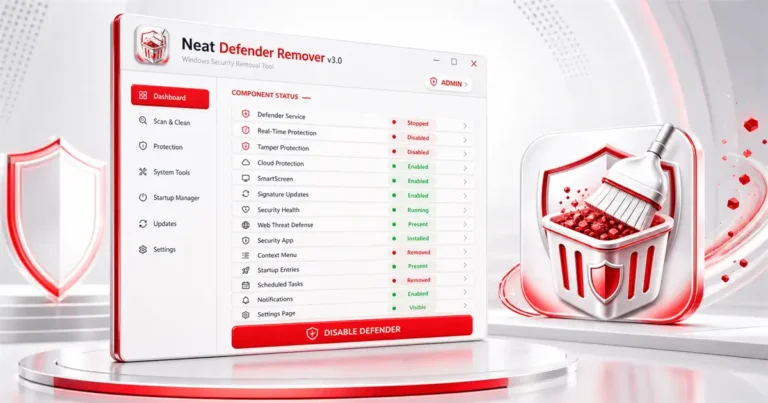
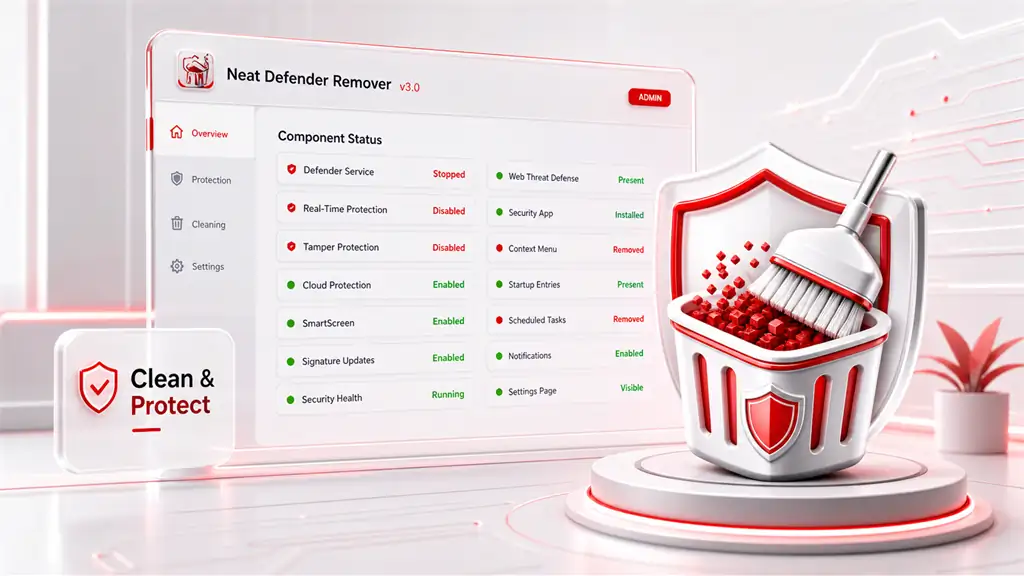
Since it uses a Live Status Dashboard, you are never guessing if the protection is active. The red and green indicators show you exactly what is running. It is a transparent and safe way to manage your system’s defensive layers.
Core Advantages of Using Neat Defender Remover
- Permanent Disabling: It stops all 14 major components of the security suite so they don’t restart after a reboot.
- Zero Installation: The portable .exe means you can carry it on your technician USB drive and use it on any client PC.
- Context Menu Cleanup: It removes the “Scan with Defender” option from your right-click menu for a cleaner interface.
- Notification Silencing: No more annoying “Action Required” pop-ups or security health warnings in your tray.
- Easy Restoration: If you ever need it back, the tool provides a direct path to re-enable everything via the Microsoft Store.
- Resource Saving: By stopping background scans, your CPU and RAM are fully available for heavy flashing tasks.
- Smart Detection: It automatically knows if Defender is already gone and updates the UI buttons to match your system state.
❓ Frequently Asked Questions
Is Neat Defender Remover v3.0 permanent?
Yes, it fully disables the services and tasks so it won’t turn back on automatically. You have to use the Enable button and the Store to bring it back.
Does this work on the latest Windows 11 updates?
Yes, version 3.0 is updated for 2026 security patches. It handles the newest versions of Windows 10 and 11 (64-bit).
Why do I need to disable Tamper Protection manually?
Microsoft blocks third-party apps from changing security settings. You must toggle it off in Windows settings so the tool can modify the registry.
Will this delete my personal files?
No, it only targets the Defender system files and settings. Your personal data and other installed software stay exactly as they are.
Can I use this alongside another Antivirus?
Yes, it is actually recommended if you plan to install a different AV. It prevents conflicts between Defender and your new security software.
📥 Installation and Usage
Follow these steps to successfully use the Neat Defender Remover v3.0 tool on your workstation:
- Download the Neat_Defender_Remover_v3.exe file to your desktop.
- Right-click the file and select Run as Administrator.
- If Tamper Protection is active, the app will prompt you to turn it off; follow the on-screen link.
- Once the dashboard shows the status, click the Disable Defender button.
- Wait for the indicators to turn Red, signifying all components are stopped.
- No reboot is required; your tools should now run without being blocked.
✨ Key Features
This utility provides a massive set of features to give you total control over your Windows security environment.
- One-Click Disable: Completely shuts down the entire Windows Defender ecosystem with a single button press.
- Real-Time Protection Kill: Stops the active scanning engine that usually blocks cracks and technician tools.
- Tamper Protection Bypass: Includes built-in checks to help you navigate and disable Microsoft’s anti-tamper logic.
- Cloud-Delivered Protection Removal: Cuts the connection to Microsoft’s cloud scanning servers for better privacy.
- SmartScreen Filter Toggle: Disables the annoying “Unrecognized App” blocks when running niche service software.
- Signature Update Blocker: Stops Windows from automatically downloading new virus definitions that might flag your files.
- Service Management: Identifies and stops every single background service related to Windows Security and Health.
- App UI Removal: Completely hides and removes the Windows Security App from your system view.
- Tray Icon Cleaner: Removes the shield icon from the taskbar so you don’t see constant warning yellow triangles.
- Context Menu Stripping: Removes the “Scan with Windows Defender” entry when you right-click on files or folders.
- Task Scheduler Cleanup: Deletes the hidden scheduled tasks that normally try to restart Defender at midnight.
- Security Notification Silencer: Blocks all notifications related to firewall, virus protection, and account security.
- Settings Page Hider: Removes the Defender-related menus from the Windows Settings app to prevent accidental changes.
- Web Threat Defense Removal: Disables the network-level scanning that can slow down your internet or block tool downloads.
- Live Status Dashboard: A real-time monitor that refreshes every 2 seconds to show the status of all 14 components.
🖥️ Requirements
| Operating System | Windows 10 / Windows 11 (64-bit Only) |
| Privileges | Must run with Administrator Rights |
| Storage | Less than 1 MB (Portable Executable) |
| Dependencies | None (No runtimes or frameworks needed) |
| Internet | Required only if you wish to re-enable via MS Store |
📜 What’s New
- v3.0 (January 2026): Added support for the latest 2026 Windows 11 builds and improved the Live Dashboard UI.
- v2.5 (2025): Improved Tamper Protection detection and added the Web Threat Defense removal feature.
- v2.0: Initial support for Windows 11 and taskbar icon removal logic.
- v1.0: Basic one-click disable for Windows 10 users.
Ratings & Reviews
0.0
out of 5
Be the first to review this application!