Neat Screen Dimmer v3.0 – Best Windows Brightness Control & Eye Care Software

Previews
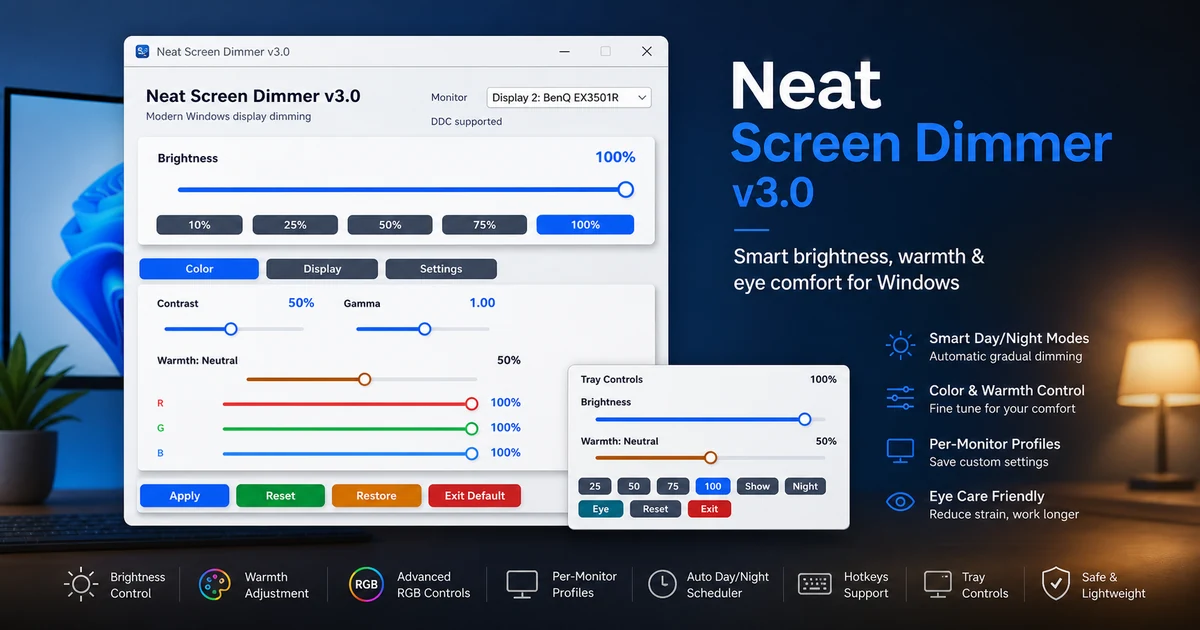
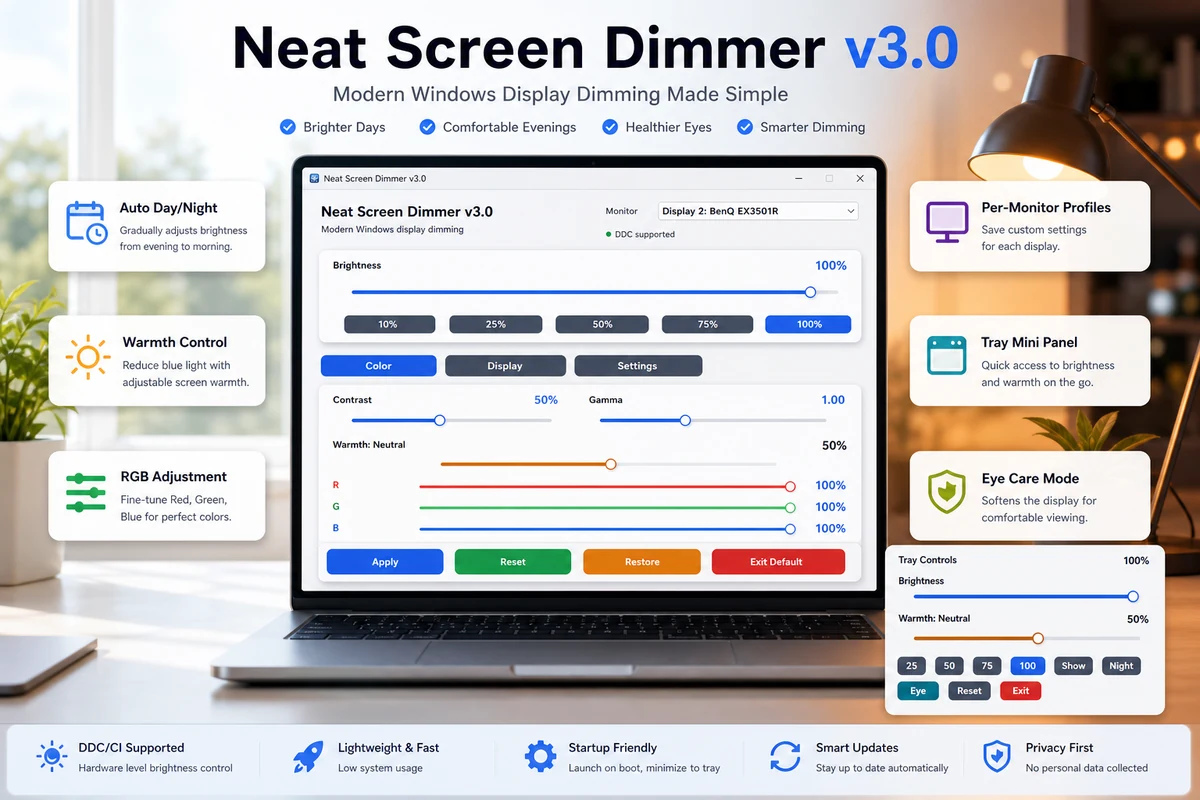
Overview of Neat Screen Dimmer v3.0 – Best Windows Brightness Control & Eye Care Software
Neat Screen Dimmer v3.0 is a specialized utility for managing Windows brightness control across multiple displays. It helps users reduce eye strain by adjusting blue light levels and screen intensity directly from the system tray.
This version focuses on eye care software standards, offering precise control over RGB color balance and gamma. It is a lightweight solution for anyone working long hours in front of a PC who needs better monitor brightness control than Windows provides by default.
The update brings a modern dashboard design and fixes several legacy bugs that caused flickering or preset errors. It is built to run in the background without eating up system resources, making it ideal for low-end and high-end workstations alike.
Automated Display Management for Daily Work
The Auto Day/Night mode is a standout feature that syncs with your PC clock. It gradually transitions your screen from a bright Day preset to a soft, warm Night Mode without any manual input needed.
Technicians and office workers can set per-monitor profiles to ensure different display brands look consistent. This is helpful when mixing older monitors with new DDC/CI supported panels that require specific hardware commands.
System Reliability and Monitor Compatibility
This tool supports Windows 11 and older versions back to Windows 7. It handles hardware-level brightness using DDC/CI but also includes a gamma/fallback dimming mode for monitors that don’t support direct software commands.
The software is designed to be a “set and forget” utility. It minimizes to tray and can be configured to start with Windows, ensuring your eye protection is active the moment you log in to your desktop.
Core Advantages of Using Neat Screen Dimmer v3.0
- Advanced Color Control: Modify Gamma, RGB, and Warmth settings individually to find the perfect balance for your environment.
- Multi-Monitor Support: Apply settings to all displays at once or create individual profiles for each screen connected to your GPU.
- Intelligent Scheduling: The Auto Eye Care feature mimics natural light cycles to prevent headaches and sleep disruption.
- Quick Access Presets: Switch between Gaming, Reading, and Editing modes instantly using the tray menu or keyboard hotkeys.
- Minimal Footprint: This Windows display utility consumes very little RAM and stays hidden in the tray until you need it.
- Hardware Fallback: If your monitor lacks DDC/CI support, the software uses software-based dimming to protect your eyes regardless.
❓ Frequently Asked Questions
Does Neat Screen Dimmer v3.0 work with multiple monitors?
Yes, it features a monitor selection dropdown. You can apply settings to all displays or configure per-monitor profiles for different screen models.
What happens if my monitor doesn’t support DDC/CI?
The software automatically switches to gamma/fallback dimming. This allows you to dim the screen effectively even on older or incompatible hardware.
How do I access the controls quickly?
You can use keyboard hotkeys or right-click the icon in the system tray. The mini tray control panel also offers quick sliders for brightness and warmth.
Can I set the software to dim automatically at night?
Yes, use the Auto Day/Night feature. It syncs with your PC time to transition from morning brightness to soft late-night comfort levels.
Does this tool affect gaming performance?
No, it is a lightweight utility that runs in the background with negligible CPU usage. It includes a specific Gaming preset to maintain visibility while reducing glare.
📥 Installation
- Download the Neat Screen Dimmer v3.0 setup file to your PC.
- Run the installer and follow the on-screen prompts to complete the process.
- Launch the app and allow it to minimize to the system tray.
- Right-click the tray icon to select your preferred Display Preset.
- (Optional) Enable Start with Windows in the settings to keep it active daily.
✨ Key Features
The Neat Screen Dimmer v3.0 offers a massive suite of tools for total Windows display management and visual comfort.
- Brightness Control: Fine-tune the light output of your monitor to match your room’s ambient lighting.
- Contrast Control: Adjust the difference between dark and light areas to improve text readability.
- Gamma Control: Modify the luminance curve to recover detail in shadows or highlights.
- RGB Color Control: Adjust Red, Green, and Blue channels individually for perfect color calibration.
- Warmth Control: Shift the white balance toward warmer tones to reduce blue light exposure.
- Night Mode: A one-click toggle to lower intensity and apply a warm filter for dark environments.
- Auto Day/Night Mode: Automatically shifts settings based on the time of day for hands-free eye protection.
- Auto Eye Care: Intelligent system that monitors usage and adjusts the screen to prevent eye fatigue.
- Monitor Selection: Choose specific displays from a list to apply changes locally.
- Apply to All Displays: Sync your settings across every monitor connected to your workstation instantly.
- Per-Monitor Profiles: Save unique configurations for different monitor brands or panels.
- Keyboard Hotkeys: Map specific keys to increase or decrease brightness without opening the app.
- Display Presets: Includes specialized modes for Reading, Gaming, Movie, Web Work, and Editing.
- Mini Tray Control Panel: A compact UI that pops up from the tray for fast slider adjustments.
- Auto-Start & Tray Minimize: Keeps the app out of your way while ensuring your settings are always active.
🖥️ Requirements
| OS | Windows 7, 8, 8.1, 10, 11 (32-bit & 64-bit) |
| Monitor | DDC/CI Supported (Recommended) or Standard Display |
| CPU | 1GHz or faster processor |
| RAM | 512MB Minimum |
| Disk Space | 50MB for installation |
📜 What’s New
- Version 3.0: Completely redesigned Modern Dashboard with cleaner text and bigger labels.
- New Icon: Updated to a new premium icon for better visibility in the taskbar.
- Tray Fixes: Resolved the issue where the tray menu would fail to open on some Windows 11 builds.
- Night Mode Fix: Fixed a bug where Night Mode would not apply correctly after a system restart.
- Stability: Fixed a crash issue related to the bottom buttons on the settings page.
- UI Polish: Improved slider movement, cleaner toggles, and fixed monitor dropdown text clipping.
- Auto-Sync: Improved time synchronization for Auto Day/Night transitions after PC wake-up.
Ratings & Reviews
0.0
out of 5
Be the first to review this application!