Neat win11clean v1.0.0 – Windows 11 Debloater, RAM Cache Cleaner, Drive Health Monitor and Repair Toolkit

Overview of Neat win11clean v1.0.0 – Windows 11 Debloater, RAM Cache Cleaner, Drive Health Monitor and Repair Toolkit
Windows 11 comes with a lot of background clutter that slows down your PC. Neat win11clean v1.0.0 is a lightweight toolkit designed to strip away the junk and keep your system running fast. It focuses on Windows 11 debloating, memory optimization, and hardware monitoring without needing a complex setup.
Unlike other tools that hide what they are doing, this app is local-first and transparent. You get full control over RAM cache cleaning and startup apps. It is a solid choice for technicians who need to fix slow machines or users who want a clean, gaming-ready OS environment.
Improve PC Speed and Stability
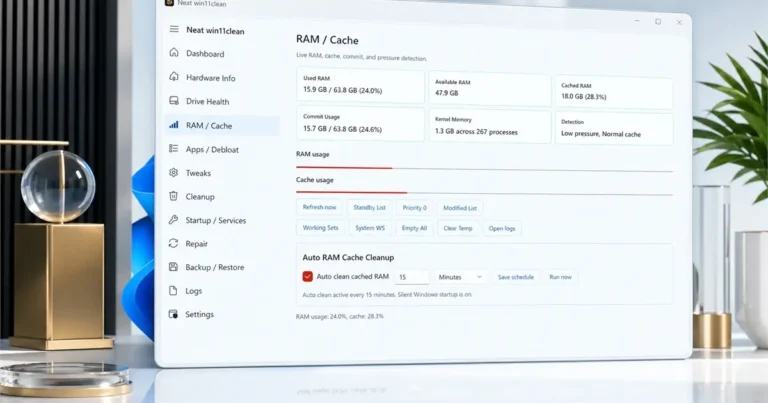
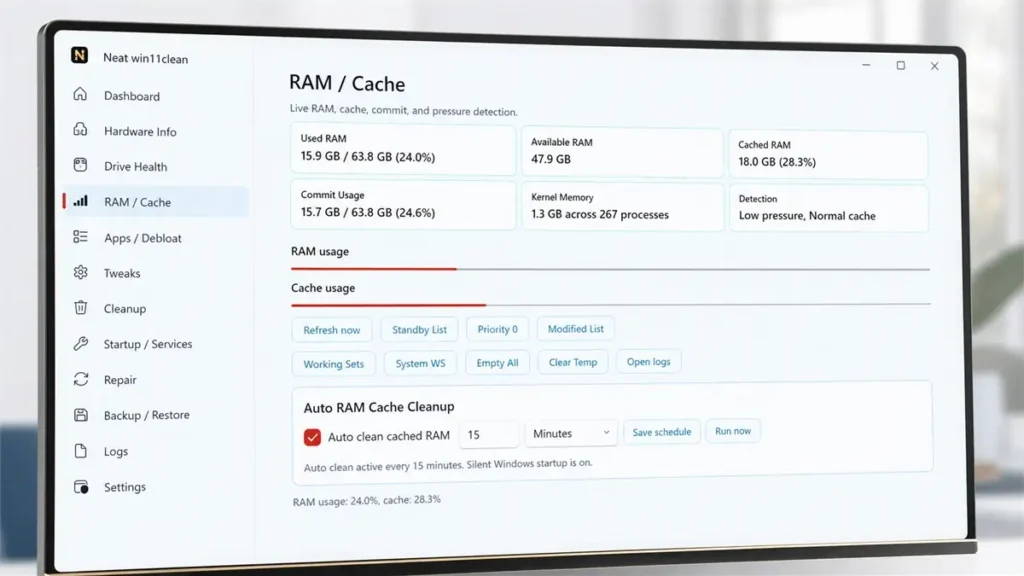
System lag often comes from cached memory that won’t clear or unnecessary background services. This tool includes a RAM Cache Cleaner that trims your working set and flushes standby memory. This helps in freeing up resources for heavy tasks like gaming or video editing.
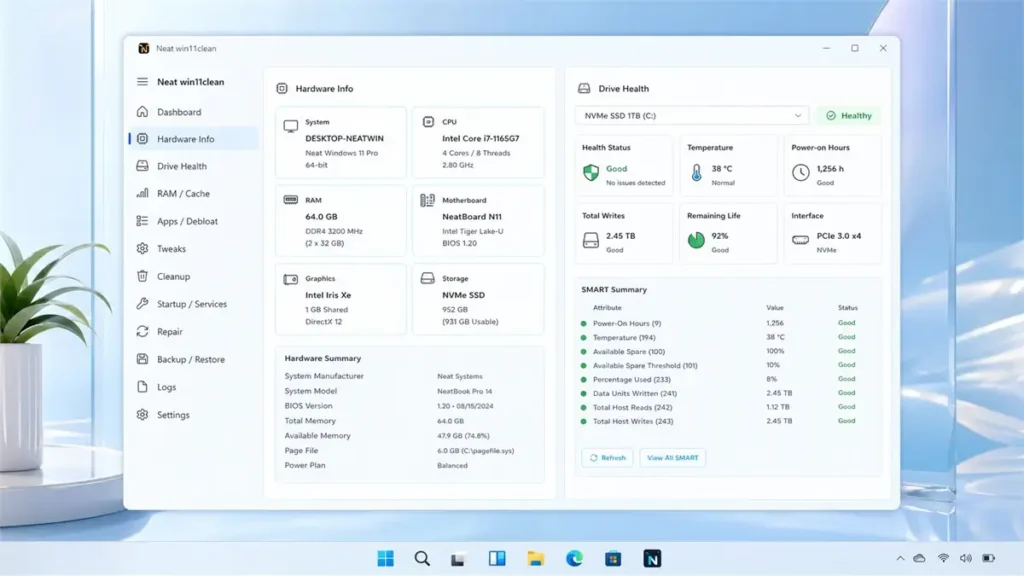
The Drive Health Monitor is another standout part of the kit. It tracks SSD SMART data and NVMe wear levels to warn you before a drive fails. Having these repair workflows in one place saves you from downloading five different programs to do one job.
Better Privacy and System Control
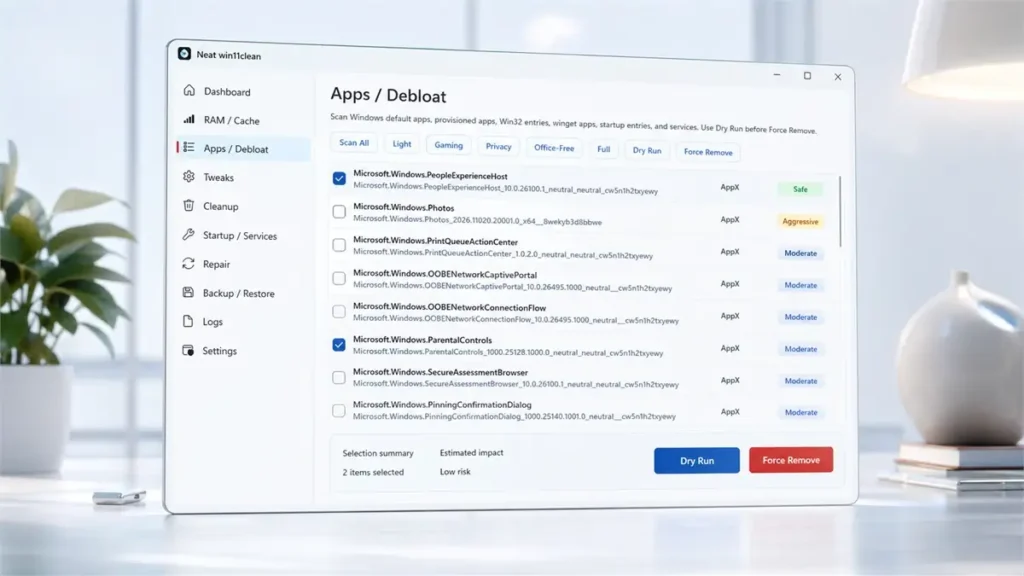
Windows 11 is known for ads in the start menu and constant telemetry. This Windows 11 Debloater allows you to toggle privacy tweaks and remove AppX packages that you never use. You can dry run these changes first to see exactly what will be removed.
Safety is a priority here. The tool lets you create System Restore points before making any deep changes. If a “Force Remove” action goes wrong, you have a backup ready to go. It is built for Windows 10 Pro and Windows 11 users who value a stable system.
Core Advantages of Using Neat win11clean
- System Debloating: Easily remove pre-installed bloatware, telemetry, and sponsored apps that eat up CPU cycles.
- Advanced RAM Management: Automatically clear standby list and cache to prevent memory leaks during long sessions.
- Health Prediction: Monitor HDD and NVMe health with real-time temperature tracking and failure prediction.
- One-Click Repairs: Run SFC and DISM commands directly from the app to fix corrupted system files.
- Privacy Tweaks: Disable Windows widgets, ads, and start menu suggestions with simple toggle switches.
- Hardware Visibility: Get a detailed inventory of your CPU, GPU, and BIOS settings without using third-party heavy software.
❓ Frequently Asked Questions
Is Neat win11clean safe for my OS?
Yes, it includes a built-in backup and restore point feature. Always create a restore point before using the “Force Remove” option on system apps.
Does it work on older versions of Windows?
The tool is designed for Windows 10 version 1809 or newer and all versions of Windows 11. It works best in Pro environments.
Will RAM cleaning affect my open apps?
The RAM cleaner trims standby memory and cached data, which is safe. It does not close your active programs or lose your work.
Can I remove OneDrive with this tool?
Yes, the AppX and Win32 scan functions can identify and remove OneDrive and other integrated Windows components.
Does the drive monitor work for NVMe SSDs?
Yes, it fully supports SMART monitoring for NVMe, SSD, and traditional HDD drives to show wear levels and temperature.
📥 Installation
- Download the NeatWin11Clean-v1.0.0-portable.zip file.
- Extract the contents to a folder on your desktop or a USB drive.
- Right-click the executable and select Run as Administrator.
- Go to the Backup / Restore tab and create a restore point first.
- Select your desired tweaks or debloat presets and apply changes.
✨ Key Features
Explore the full set of tools included in this maintenance suite for better PC performance.
- Dashboard: A centralized view of your system with shortcuts for silent startup and quick RAM cleanup scheduling.
- Hardware Info: Provides a CPU-Z style breakdown of your CPU, BIOS, Motherboard, GPU, and battery health sensors.
- Drive Health Monitor: Detailed tracking of SMART status, reallocated sectors, and power-on hours for all storage drives.
- RAM / Cache Cleaner: Live monitoring of commit usage and kernel memory with manual or scheduled standby list clearing.
- App Debloater: Scans for AppX, Winget, and Win32 apps with “Dry Run” capabilities to prevent accidental deletions.
- System Tweaks: A dedicated section for Explorer tweaks, disabling ads, and managing Windows 11 widgets.
- Deep Cleanup: Cleans temporary files, Recycle Bin, and the Windows component store (WinSxS) to save disk space.
- Startup & Services: View and disable non-critical services and startup items that slow down your boot time.
- Repair Toolkit: Direct access to DISM RestoreHealth, SFC Scannow, DNS flush, and Windows Update reset tools.
- Backup & Restore: Integrated system restore point creation and inventory export for safety during debloating.
- Detailed Logs: local logging of every command and skipped item to help you track changes made to the system.
🖥️ Requirements
| OS | Windows 10 (1809+) / Windows 11 |
| Architecture | x64 / 64-bit |
| Privileges | Administrator Rights Required |
| Storage | Minimum 50MB free space |
📜 What’s New
- v1.0.0 (Initial Release): Full support for Windows 11 debloating and RAM cache management.
- v1.0.0: Added SMART drive monitoring for NVMe and SSD health tracking.
- v1.0.0: Integrated DISM and SFC repair workflows for system recovery.
- v1.0.0: Added AppX and Winget package scanning for easy software removal.
Ratings & Reviews
0.0
out of 5
Be the first to review this application!